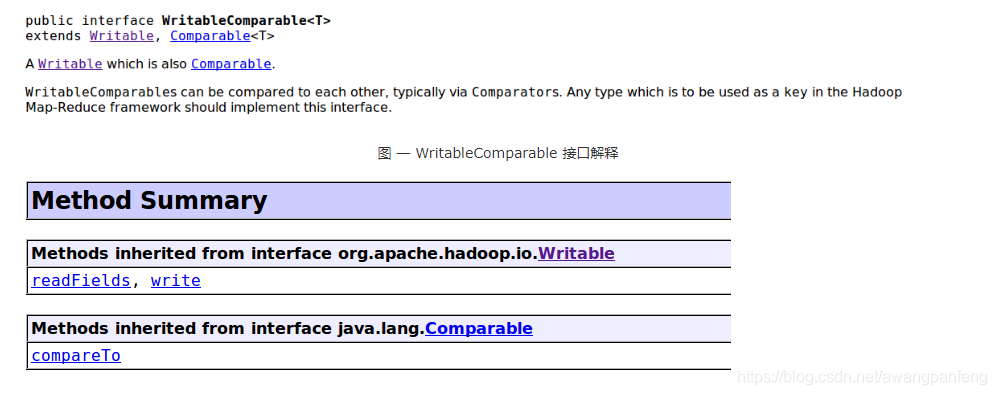
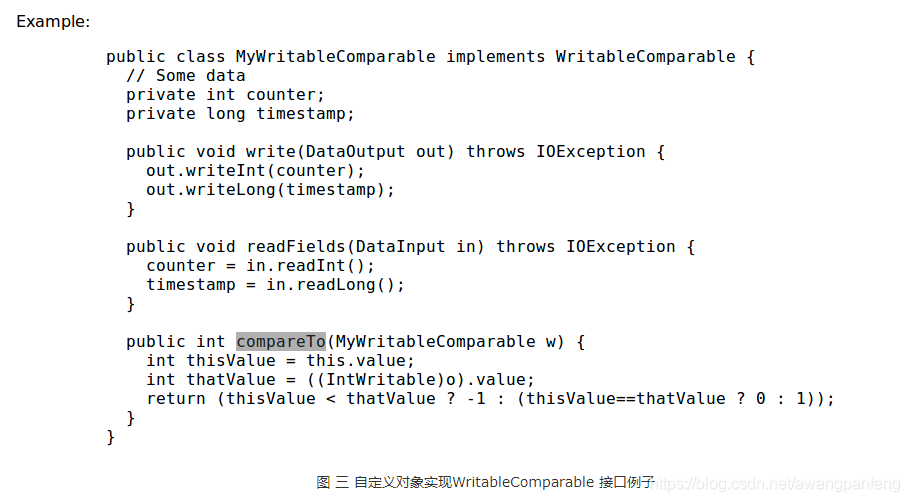
在这之前要先说一下WritableComparable接口。Writable接口大家可能都知道,它是一个实现了序列化协议的序列化对象。在Hadoop中定义一个结构化对象都要实现Writable接口,使得该结构化对象可以序列化为字节流,字节流也可以反序列化为结构化对象。那WritableComparable接口是可序列化并且可比较的接口。MapReduce中所有的key值类型都必须实现这个接口,既然是可序列化的那就必须得实现readFiels()和write()这两个序列化和反序列化函数,既然也是可比较的那就必须得实现compareTo()函数,该函数即是比较和排序规则的实现。这样MR中的key值就既能可序列化又是可比较的。下面几符图是API中对WritableComparable接口的解释及其方法,还有一个实现了该接口的对象的列子:

从图三可以看到自定义的对象实现WritableComparable接口除了实现readFields和write方法之外,还必须得实现compareTo()方法,这也是key值排序的关键,实现了改方法key值之间是可比较可排序的,所以也不用另外写排序函数了。Hadoop提供的数据类型如Text,IntWritable,LongWritable,DoubleWritable和FloatWritable等也都实现了WritableComparable接口。

所以我们最开始写wordcount等例子,我们使用LongWritable,Text等类型做key值并没有去实现compareTo函数,最后结果也是排序好的,就是因为Hadoop提供的数据类型已经实现了WC接口,已经实现了compareTo函数了。如果你有特殊要求,Text,IntWritable这些类型不能满足你对key值的要求,需要自己新建一个数据对象作为自己的key值类型,那就像上图 图三那样重写一个类实现WritableComparable接口,同时实现compareTo函数,函数内部实现你自己的排序规则,最后reduce的数据就会按key值排序了。

Read more »

数据倾斜:shuffle操作时,由于相同key会被分配到同一个reduce端执行,而大部分数据的key值相同,导致部分task处理的数据量过大,分配不均。

触发shuffle的常见算子:distinct、groupByKey、reduceByKey、aggregateByKey、join、cogroup、repartition等。

查看导致数据倾斜的key的数据分布情况

根据执行操作的不同,可以有很多种查看key分布的方式:

1、如果是Spark SQL中的group by、join语句导致的数据倾斜,那么就查询一下SQL中使用的表的key分布情况。

2、如果是Spark RDD执行shuffle算子导致的数据倾斜,那么可以在Spark作业中加入查看key分布的代码,比如RDD.countByKey()。然后对统计出来各个key出现的次数,collect、take到客户端打印一下,就可以看到key的分布情况。

原理:将原本相同的key通过附加随机前缀的方式,变成多个不同key,就可以让原本被一个task处理的数据分散到多个task上做局部聚合,进行解决单个task处理数据量过多的问题。接着去除随机前缀,再次进行全局的聚合,就可以得到最终的结果。

1
2
3
4
5
6
7
8
9
10
11
12
13
14
15
16
17
18
19
20
21
22
23
24
25
26
27
28
29
30
31
32
33
34
35
36
37
38
39
40
41
42
43
44
45
46
47
48
49
50
51
52
53
54
55
56
object _01SparkDataSkewTwoStageOps {
def main(args: Array[String]): Unit = {
Logger.getLogger("org.apache.hadoop").setLevel(Level.WARN)
Logger.getLogger("org.apache.spark").setLevel(Level.WARN)
Logger.getLogger("org.project-spark").setLevel(Level.WARN)
val sc = SparkUtil.sparkContext("local[2]", "_01SparkDataSkewTwoStageOps")
val list = List(
"hello you hello hello me",
"hello you hello hello shit",
"oh hello she study"
)

val listRDD = sc.parallelize(list)

val pairsRDD = listRDD.flatMap(line => line.split("\\s+")).map((_, 1))
//step 1 找到发生数据倾斜key
val sampleRDD = pairsRDD.sample(false, 0.6)
val cbk= sampleRDD.countByKey()
// cbkRDD.foreach(println)
val sortedInfo = cbk.toBuffer.sortWith((t1, t2) => t1._2 > t2._2)
val dataSkewKey = sortedInfo.head._1
// sortedInfo.foreach(println)
println("发生了数据倾斜的Key:" + dataSkewKey)
//step 2 给对应的key打上N以内的随机前缀
val prefixPairsRDD = pairsRDD.map{case (word, count) => {
if(word.equals(dataSkewKey)) {
val random = new Random()
val prefix = random.nextInt(2)//0 1
(s"${prefix}_${word}", count)
} else {
(word, count)
}
}}
prefixPairsRDD.foreach(println)
//step 3 局部聚合
val partAggrInfo = prefixPairsRDD.reduceByKey(_+_)
println("===============>局部聚合之后的结果:")
partAggrInfo.foreach(println)
//step 4 全局聚合
//step 4.1 去掉前缀
val unPrefixPairRDD = partAggrInfo.map{case (word, count) => {
if(word.contains("_")) {
(word.substring(word.indexOf("_") + 1), count)
} else {
(word, count)
}
}}
println("================>去掉随机前缀之后的结果:")
unPrefixPairRDD.foreach(println)
// step 4.2 全局聚合
val fullAggrInfo = unPrefixPairRDD.reduceByKey(_+_)
println("===============>全局聚合之后的结果:")
fullAggrInfo.foreach(println)
sc.stop()
}
}

先聚合小数据集,再聚合整体。

Read more »

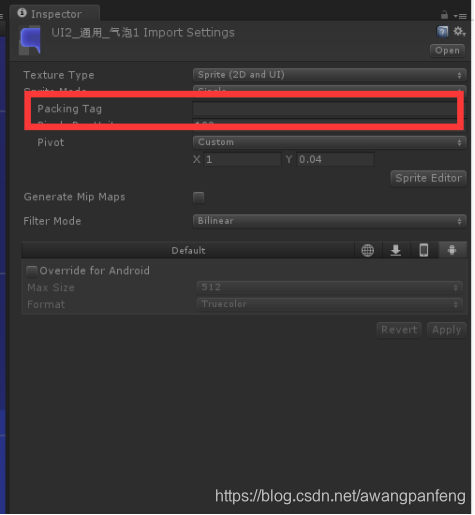
打包图集:将一个个小图打包成图集,以减小Drawcall,打包成图集一次性加载以内存换取图片读取效率,Unity自动会将这些小图按照Packing Tag名字打到图集里面去。

在这里插入图片描述

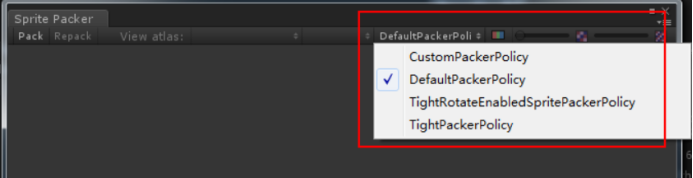
打图集策略:

在这里插入图片描述

1、DefaultPackerPolicy:是默认的打包方式,也是矩形打包方式。会把所有的小图按照矩形的方式来排列,如果宽高不一样的图片,它们会自动补齐,使用方式就是tag设置时加上“[RECT]图集名”来设置;

2、TightPackerPolicy:是紧密打包方式,尽可能的把图片都打包在图集上,这种方式要比DefaultPackerPolicy打包的图片更多一些,也就是更省空间,使用方式就是tag设置时加上“[TIGHT]图集名”来设置;

3、TightRotateEnabledPackerPolicy:是紧密可旋转打包方式,也就是使用紧密打包,并且允许精灵进行旋转;

4、CustomPackerPolicy:是自定义打包方式,需要在一个编辑器脚本类中实现UnityEditor.Sprites.IPackerPolicy接口,并重写GetVersion和OnGroupAtlase两个接口。

注意事项:
1、Resources目录下的资源是不会被SpritePack打到图集里面去的;

2、SpritePack生成的图集默认放在Libary/AtlasCache里面;

Read more »

在学习Android中的Handler消息传递机制时,创建新线程有两种方式:一种是实现Runnable接口(implements Runnable)而另一种则是继承Thread类(extends Thread)。

1
2
3
4
5
6
7
8
9
10
11
12
13
14
15
16
public class ThreadA implements Runnable {
public void run() {
//Code
}
}
//调用 "new Thread(threadA).start()" 来开启线程

public class ThreadB extends Thread {
public ThreadB() {
super("ThreadB");
}
public void run() {
//Code
}
}
//调用 "threadB.start()" 来开启线程

//调用 “threadB.start()” 来开启线程

它们之间的不同是:

      1.我们都知道,Java是单继承机制,不允许同时继承多个类。因此,当你继承Thread类(extends Thread)后,你就不能再继承其他类了。而你实现Runnable接口就不一样了,你可以继承其他类了。

      2.当你继承Thread类时,你的每一个Thread对象创造不同的对象然后关联它们。

而继承Runnable接口则不一样,多个线程共享一个对象。

1
2
3
4
5
6
7
8
9
10
11
12
13
14
15
16
17
18
19
20
21
22
23
24
25
26
27
28
29
30
31
32
33
34
35
36
37
38
39
40
41
42
43
44
45
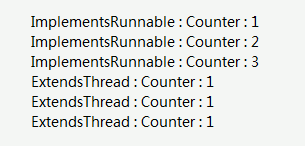
class ImplementsRunnable implements Runnable {

   private int counter = 0;

   public void run() {
   counter++;
   System.out.println("ImplementsRunnable : Counter : " + counter);
}
}

class ExtendsThread extends Thread {

  private int counter = 0;

public void run() {
   counter++;
  System.out.println("ExtendsThread : Counter : " + counter);
}
}

public class ThreadVsRunnable {

public static void main(String args[]) throws Exception {
//多线程共享一个对象
  ImplementsRunnable rc = new ImplementsRunnable();
   Thread t1 = new Thread(rc);
   t1.start();
  Thread.sleep(1000); // 在开启下个线程前先等待1秒
   Thread t2 = new Thread(rc);
   t2.start();
  Thread.sleep(1000); // 在开启下个线程前先等待1秒
   Thread t3 = new Thread(rc);
   t3.start();

//为每一个线程创造新的实例
   ExtendsThread tc1 = new ExtendsThread();
   tc1.start();
   Thread.sleep(1000); // 在开启下个线程前先等待1秒
   ExtendsThread tc2 = new ExtendsThread();
  tc2.start();
  Thread.sleep(1000); // 在开启下个线程前先等待1秒
   ExtendsThread tc3 = new ExtendsThread();
   tc3.start();
}
}

运行结果:

Read more »

明天,第一批

70后可知天命了,

80后终于不惑了,

90后已到而立之年了,

终于知道什么叫光阴似箭,日月如梭了。

无论爱过、恨过、不管哭过、笑过。

2019,我们的生命里都将永不再有。

这一年,似乎大家都在说:“我太难了”

01

这一年3月,牺牲在凉山木里森林大火中的30位消防官兵,让我们明白了“哪有什么岁月静好,只不过是有人在为我们负重前行。”

Read more »

分层实验概念:每个独立实验为一层,层与层之间流量是正交的。 简单来讲,就是一份流量穿越每层实验时,都会再次随机打散,且随机效果离散。

所有分层实验的奠基石–Goolge论文

《Overlapping Experiment Infrastructure More, Better, Faster Experimentation》

下面将以一个简单例子来解释分层实验核心原理,如果要了解全貌,可以看一下上面论文

首先来看一下MD5的作为hash的特点,本文以最简单得MD5算法来介绍分层实验。(但一定要知道,实际应用场景复杂,需要我们设计更复杂的hash算法)

MD5 特点

压缩性:任意长度的数据,算出的MD5值长度都是固定的。

1、容易计算:从原数据计算出MD5值很容易。

2、抗修改性:对原数据进行任何改动,哪怕只修改1个字节,所得到的MD5值都有很大区别。(重要理论依据!)

3、弱抗碰撞:已知原数据和其MD5值,想找到一个具有相同MD5值的数据(即伪造数据)是非常困难的。

Read more »

查看Configuration的源码可以看到文件加载了这两个配置,所以在集群中,如果直接 Configuration conf = new Configuration(); 不给conf配置的话,会默认去读取DefaultResource这两个参数的内容

1
2
addDefaultResource("core-default.xml");
addDefaultResource("core-site.xml");

当我们有这个Configuration的时候,我们可以手动设置里面的某些参数了,设置方法:

1
conf.set("参数名", 参数值);

我在当前jia包下建立了一个myconfig.xml,内容如下,我放在集群的hadoop的配置文件下 $HADOOP_HOME/etc/hadoop下;

1
2
3
4
5
6
7
8
9
<?xml version="1.0" encoding="UTF-8"?>
<?xml-stylesheet type="text/xsl" href="configuration.xsl"?>
<configuration>
<property>
<name>zks</name>
<value>people</value>
<description>this used test hadoop configuation</description>
</property>
</configuration>

代码如下:

1
2
3
4
5
6
7
8
9
10
11
12
13
14
15
16
17
18
19
20
21
22
23
24
25
26
27
package com.myhadoop.configuation;

import org.apache.hadoop.conf.Configuration;
import org.apache.hadoop.mapreduce.Job;
import java.io.IOException;
public class HadoopConfiguation {
public static void main(String[] args) {

//默认加载$HADOOP_HOME/etc/hadoop下的core-default.xml,core-site.xml
Configuration conf = new Configuration();
//输出集群的信息看看
System.out.println("fs.defaultFS: "+conf.get("fs.defaultFS"));

//自定义加载myconfig.xml
conf.addResource("myconfig.xml");
String str=conf.get("zks");
System.out.println("myconfig.xml: "+str);

conf.set("zks","aaaaa");
System.out.println(conf.get("zks"));

//随便设置一个
conf.set("hello","it's me");
System.out.println(conf.get("hello"));
}
}

打包执行然后输出:

1
2
3
4
5
hadoop jar hadoopconfig.jar 
fs.defaultFS: hdfs://master:9000
myconfig.xml: people
aaaaa
it's me
Read more »

在我们写mapreduce的程序时候总会有这么一段代码,这个代码就是map方法的实现,里面有一个参数 context对象,但是这个context对象究竟是干什么的呢?

1
2
3
4
5
6
7
8
9
10
public void map(Object key, Text value, Context context
) throws IOException, InterruptedException
{
StringTokenizer itr = new StringTokenizer(value.toString());
while (itr.hasMoreTokens())
{
word.set(itr.nextToken());
context.write(word, one);
}
}

CONTEXT和其他类和其他接口的关系:

Context 类是Mapper 类的内部抽象类,它实现了MapContext 接口MapContext 里面可以得到split的信息,这个接口实现了 TaskInputOutputContext 这个接口

taskInputOutputContext 这个接口里面一些记录 getCurrentKey、getCurrentValue、nextKeyValue, getOutputCommitter(这个是一个OutputCommitter的抽象类,这个提供了提交的一些操作方法和属性)的方法,这个接口实现了TaskAttemptContext这个接口;

​TaskAttemptContext 这个接口保存了 task的一些信息,这个接口实现了JobContext和Progressable这个接口;

​JobContext和Progressable这个2个接口,这2个接口保存了job的信息和程序运行过程的进展;

​从上面的源码可以看出来, setup方法来处理context对象,可以为对象增加一些新的成员,或者修改之前成员,从map方法来看,context对象是做为一个参数传给map函数,在Mapper类的实例中是可以拿到Context这个上下文对象的.

1
2
3
4
5
6
7
8
9
10
11
12
13
14
15
16
public void run(Context context) throws IOException, InterruptedException 
{
setup(context);
try
{
while(context.nextKeyValue())
{
map(context.getCurrentKey(),context.getCurrentValue(), context);
}
}
finally
{
cleanup(context);
}

}

context它是mapper的一个内部类,简单的说顶级接口是为了在map或是reduce任务中跟踪task的状态,很自然的MapContext就是记录了map执行的上下文,在mapper类中,这个context可以存储一些job conf的信息,比如job运行时参数等,我们可以在map函数中处理这个信息,这也是hadoop中参数传递中一个很经典的例子,同时context作为了map和reduce执行中各个函数的一个桥梁,这个设计和java web中的session对象、application对象很相似.

Read more »

JobControl由两个类组成:Job和JobControl。

Job类封装了一个MapReduce作业及其对应的依赖关系,主要负责监控各个依赖作业的运行状态,一次更新自己的状态。

作业刚开始处于WAITING状态。如果没有依赖作业或者所有作业均已运行完成,则进入READY状态。一旦进入REDAY状态,则作业可被提交到Hadoop集群上运行,并进入RUNNING状态。在RUNNING状态下,根据作业运行情况,可能进入SUCCESS或者FAILED状态。

需要注意的是,如果一个作业的依赖作业失败,则该作业也会失败,于是形成“多米诺骨牌效应”,后续所有作业均会失败.

1
2
3
4
5
6
7
8
9
10
11
12
13
14
15
16
17
18
19
20
21
22
23
24
25
26
27
28
29
30
31
32
33
34
35
36
37
38
39
40
41
42
43
44
45
46
47
48
49
50
51
52
53
54
55
56
57
58
59
60
61
62
63
64
65
66
67
68
69
70
71
72
73
74
75
76
77
78
79
80
81
82
83
84
85
86
87
88
89
90
91
92
93
94
95
96
97
98
99
100
101
102
103
104
105
106
107
108
109
110
111
112
113
114
115
116
117
118
119
120
121
122
123
124
125
126
127
128
129
130
package hadoop;

import java.io.IOException;
import java.util.StringTokenizer;
import org.apache.hadoop.conf.Configuration;
import org.apache.hadoop.fs.FileSystem;
import org.apache.hadoop.fs.Path;
import org.apache.hadoop.io.IntWritable;
import org.apache.hadoop.io.Text;
import org.apache.hadoop.mapred.lib.MultipleTextOutputFormat;
import org.apache.hadoop.mapreduce.Job;
import org.apache.hadoop.mapreduce.Mapper;
import org.apache.hadoop.mapreduce.Reducer;
import org.apache.hadoop.mapreduce.lib.input.FileInputFormat;
import org.apache.hadoop.mapreduce.lib.jobcontrol.ControlledJob;
import org.apache.hadoop.mapreduce.lib.jobcontrol.JobControl;
import org.apache.hadoop.mapreduce.lib.output.FileOutputFormat;
import org.apache.hadoop.mapreduce.lib.output.MultipleOutputs;
import org.apache.hadoop.mapreduce.lib.output.TextOutputFormat;
import org.apache.hadoop.util.GenericOptionsParser;

import scala.reflect.generic.Trees.New;

public class WordCount {

public static class WordCountMapper extends Mapper<Object, Text, Text, IntWritable>{
private static final IntWritable Number = new IntWritable(1);
private Text word = new Text();
@Override
protected void map(Object key, Text value, Context context)
throws IOException, InterruptedException {
StringTokenizer stringTokenizer = new StringTokenizer(value.toString());
while(stringTokenizer.hasMoreTokens()){
String string = stringTokenizer.nextToken();
word.set(string);
context.write(word, Number);
}
}

}

public static class WordCountReduce extends Reducer<Text, IntWritable, Text, IntWritable>{

@Override
protected void reduce(Text key, Iterable<IntWritable> vlaues,
Context context) throws IOException, InterruptedException {
int num=0;
for(IntWritable intWritable:vlaues){
num+=intWritable.get();

}
context.write(key, new IntWritable(num));
}

}
public static class WordCountMapper1 extends Mapper<Object, Text, Text, IntWritable>{
private static final IntWritable Number = new IntWritable(1);
private Text word = new Text();
@Override
protected void map(Object key, Text value, Context context)
throws IOException, InterruptedException {
StringTokenizer stringTokenizer = new StringTokenizer(value.toString());
while(stringTokenizer.hasMoreTokens()){
String string = stringTokenizer.nextToken();
word.set(string);
context.write(word, Number);
}
}

}

public static class WordCountReduce1 extends Reducer<Text, IntWritable, Text, IntWritable>{

@Override
protected void reduce(Text key, Iterable<IntWritable> vlaues,
Context context) throws IOException, InterruptedException {
int num=0;
for(IntWritable intWritable:vlaues){
num+=intWritable.get();

}
context.write(key, new IntWritable(num));
}

}

public static void main(String[] args) throws IOException, ClassNotFoundException, InterruptedException {
Configuration conf = new Configuration();
String[] argsValues = new GenericOptionsParser(conf, args).getRemainingArgs();

JobControl jobControl = new JobControl("jobcontrol");

Job job = new Job(conf, "word count1");
job.setJarByClass(WordCount.class);
job.setMapperClass(WordCountMapper.class);
job.setReducerClass(WordCountReduce.class);
job.setOutputKeyClass(Text.class);
job.setOutputValueClass(IntWritable.class);
FileInputFormat.addInputPaths(job, argsValues[0]);
FileOutputFormat.setOutputPath(job, new Path(argsValues[1]));


Job job2 = new Job(conf, "word count2");
job2.setJarByClass(WordCount.class);
job2.setMapperClass(WordCountMapper1.class);
job2.setReducerClass(WordCountReduce1.class);
job2.setOutputKeyClass(Text.class);
job2.setOutputValueClass(IntWritable.class);
FileInputFormat.addInputPaths(job2, argsValues[1]);
FileOutputFormat.setOutputPath(job2, new Path(argsValues[2]));

ControlledJob controlledJob = new ControlledJob(conf);
controlledJob.setJob(job);
ControlledJob controlledJob2 = new ControlledJob(conf);
controlledJob2.setJob(job2);
controlledJob2.addDependingJob(controlledJob);
jobControl.addJob(controlledJob);
jobControl.addJob(controlledJob2);
Thread thread = new Thread(jobControl);
thread.start();
while(true){
if(jobControl.allFinished()){
System.out.println(jobControl.getSuccessfulJobList());
jobControl.stop();
break;
}
}
}

}
Read more »

1、MapReduce计数器是什么?

  计数器是用来记录job的执行进度和状态的。它的作用可以理解为日志。我们可以在程序的某个位置插入计数器,记录数据或者进度的变化情况。

2、MapReduce计数器能做什么?

  MapReduce 计数器(Counter)为我们提供一个窗口,用于观察 MapReduce Job 运行期的各种细节数据。对MapReduce性能调优很有帮助,MapReduce性能优化的评估大部分都是基于这些 Counter 的数值表现出来的。

MapReduce 任务计数器
文件系统计数器
FileInputFormat 计数器
FileOutputFormat 计数器
作业计数器

3、计数器的该如何使用?

定义计数器

1)枚举声明计数器

1
2
// 自定义枚举变量Enum 
Counter counter = context.getCounter(Enum enum)

2)自定义计数器

Read more »